

Get faster, every lap.
Everything a pit wall sees, live and after the session.
Live telemetry on any screen next to your rig. Open it to your coach, your league or your stream.
Everything, in one cockpit.
Gear, delta, tyres, fuel on any device - the moment you go green.
Sector deltas, consistency, corner-by-corner time loss. Find the tenths.
Coach links and OBS overlays - your race, visible to whoever you want.
Live data, on the screen next to you
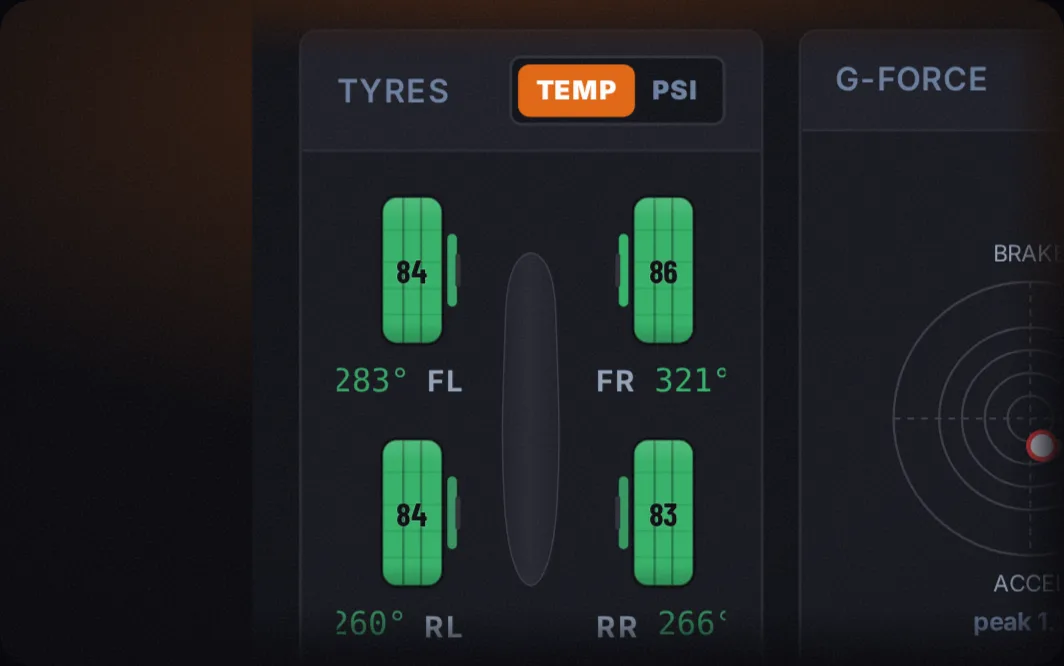
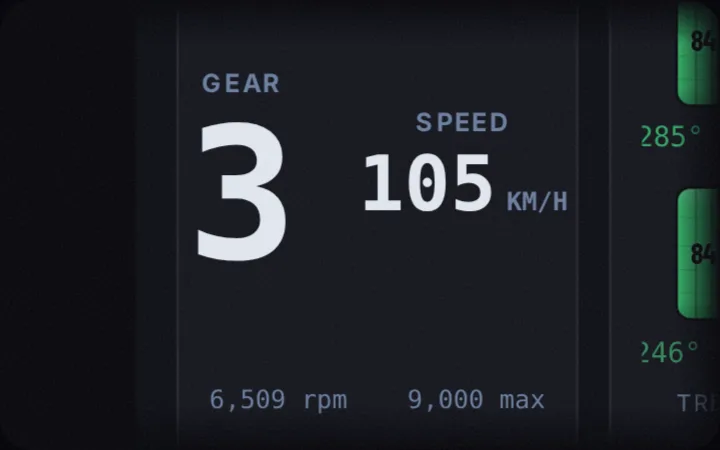
The moment you go green, Overcut streams the channels that actually decide a lap. Throttle and brake traces, steering angle, gear and engine rpm, tyre temperatures and pressures on all four corners, fuel load, g-forces, and your delta to your own best, all updating live.
Because the dashboard runs in your browser, you read it wherever it helps: a tablet propped on the desk, a phone on a stand, or a spare monitor. No alt-tab out of the sim, no second PC, no capture card to wrestle with.
Find the exact corner that is costing you
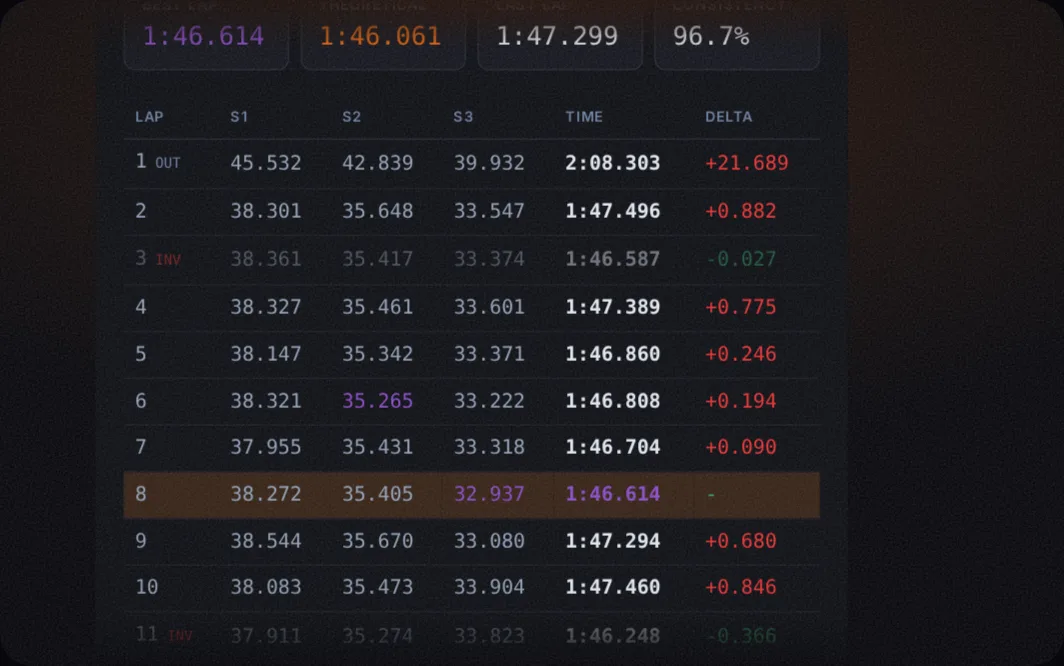
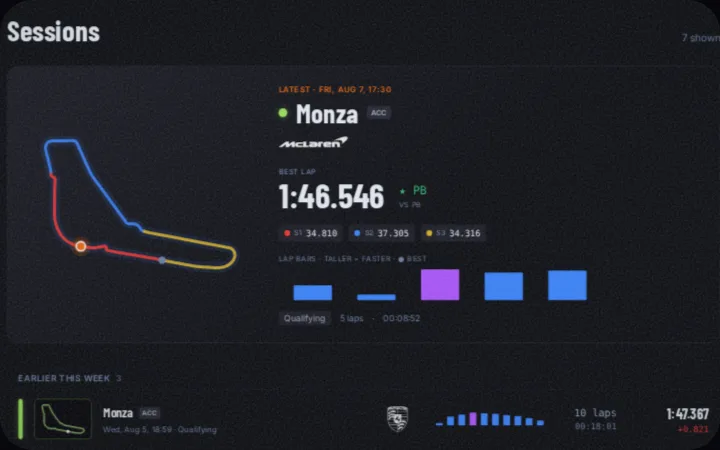
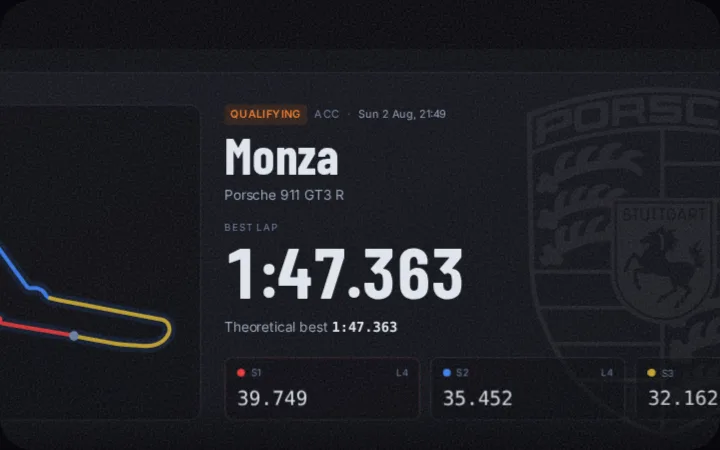
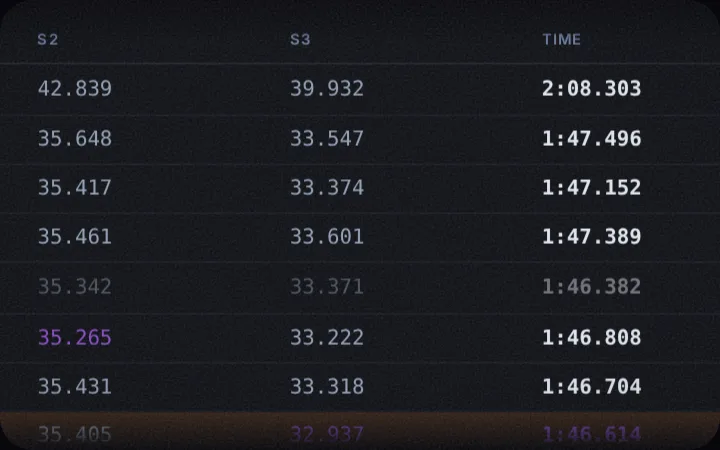
Every lap is saved the instant it finishes. Open a session and you get the full lap table with sector splits, a theoretical best stitched from your fastest sectors, and a consistency read across the whole run.
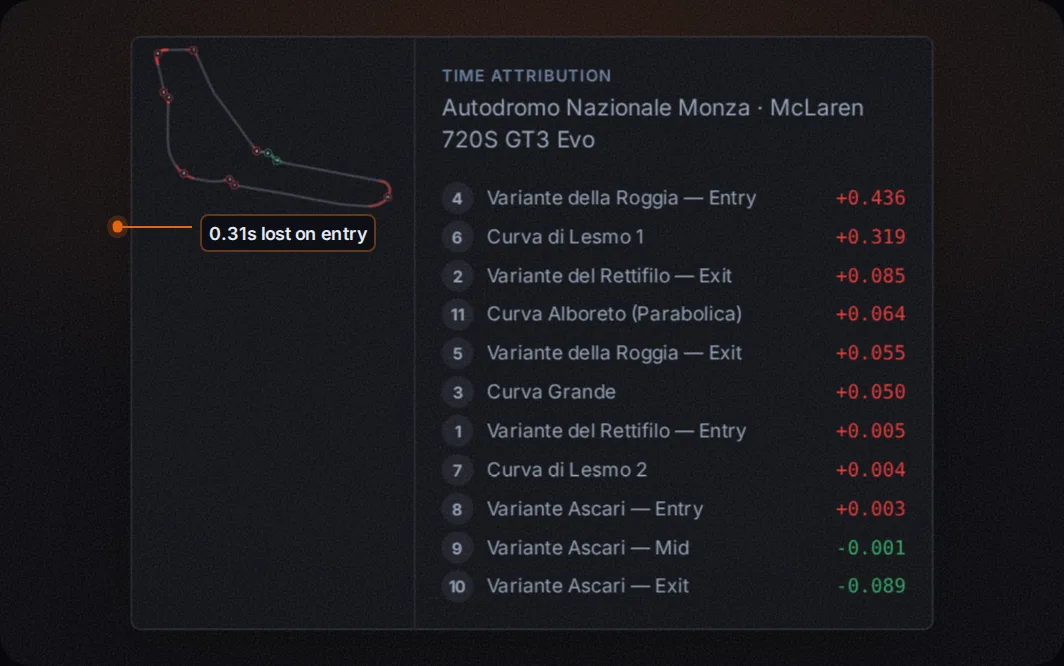
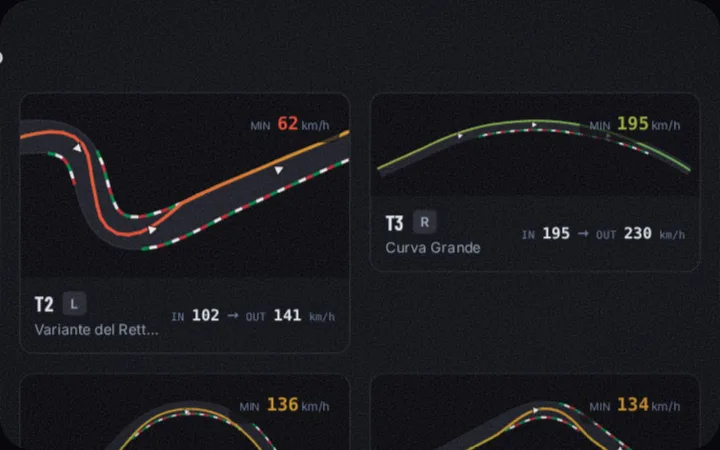
Time attribution paints each tenth onto the track map, so you can tell whether the loss is on entry, mid-corner, or exit, one corner at a time. Put two laps side by side and the difference becomes a trace you can see, not a number you have to take on faith.
Send a session to a coach or a friend
Hand anyone a read-only link and they open the session in a browser with nothing to install. A coach can pick apart your braking points; a quicker friend can show you exactly where they pull away.
When you want help in the moment, a coach can follow your telemetry live through a private link while you drive, so the feedback lands during the stint instead of hours later. The stream is a pipe: nothing is recorded on our side, and the link carries only what you choose to show.
Your racing identity, on one public page
Claim a handle and you get a public page at overcut.gg/u/yourname that anyone can open, with no account needed to view it. It gathers your best laps per track and car, your recent sessions, the badges you have earned, and your links.
It is the page you drop into a league sign-up or a Discord bio when someone asks how quick you are. You stay in control of exactly what shows.
See where you actually stand
A lap time on its own means little. Overcut compares your laps against other drivers on the same track and car and gives you a percentile, so a 1:48.2 finally comes with context: quick, or just quick for you.
The comparison is privacy-preserving. It runs on aggregated cohorts, never exposes anyone's raw data, and only counts you in when you opt in.
Know exactly where you stand, live
When you are racing a grid, Overcut puts a live standings tower on your screen: every car's position, gap to the leader, rolling pace and trend, and who is battling whom right now. It reads the race as it unfolds, so you always know who is closing on you and where the time is moving.
Dressed for broadcast
Add your telemetry to a stream as a browser source and your audience sees gear, delta, tyres and fuel without a heavy overlay plugin. It is the same live data as your dashboard, styled for the overlay, and it is live in a couple of minutes.
One tool, more sims over time
Overcut speaks a single, game-agnostic telemetry model, so the dashboard and the analysis never care which simulator you are running. Assetto Corsa Competizione, Gran Turismo 7, Automobilista 2 and iRacing are live today, with more in build.




See it in action
Real captures from a recorded Monza session. Nothing here is a mockup.
Start free. Upgrade when you want more.
- ✓Live dashboard on any device
- ✓Lap & sector analysis
- ✓Corner attribution
- ✓Local capture & replay
- ✓ACC, GT7, AMS2 and iRacing
- ✓Everything in Free
- ✓Stream overlays for OBS
- ✓Layouts synced across devices
- ✓Private session links for a coach
- ✓Run leagues and championships
- ✓Setup generation for your style
Questions, answered
Is Overcut free?
Yes. The local core is free with an account. A paid tier adds cloud sync, benchmark cohorts, coach links and stream overlays.
Which simulators are supported?
Assetto Corsa Competizione and Gran Turismo 7 today. The architecture is multi-game, so more sims follow without changing how you work.
Do I have to install anything?
A small Windows Connector reads your sim. The dashboard itself runs in any browser, so there is nothing to install on the device you read from.
Can I use it on a tablet or phone?
Yes, that is the whole point. Open the dashboard on any device on your network and read your data there while you drive.
Does my telemetry leave my PC?
No. Raw frames are processed locally on your PC and never uploaded. Only the session metadata you opt into ever syncs.
Can I share a session with a coach?
Yes. Send a read-only link they open in a browser, or let a coach watch your telemetry live through a private link while you drive.
What is a public profile?
A page at overcut.gg/u/yourname with your best laps, recent sessions and badges. Anyone can view it, and you decide what is public.
How do benchmarks work?
Your laps are compared against other drivers on the same track and car to give you a percentile, using privacy-preserving cohorts that never expose raw data.
Can I use it for streaming?
Yes. Add a browser source in OBS and your telemetry becomes a live overlay your viewers can read.
Why do I need an account?
A free account keeps your sessions, profile and settings tied to you across devices. It does not move your raw telemetry off your PC.
Get in touch
Questions, feedback, or want in early? The fastest way to reach us is Discord.